





Discover the top 5 AI video editing plugins for Premiere Pro that will streamline your editing process and enhance your creative workflow.
Video editing has become an essential part of the creative process, and Adobe Premiere Pro is one of the leading software programs used by professionals and enthusiasts alike. However, manually editing videos can be time-consuming, especially when dealing with large projects.
AI video editing plugins for Premiere Pro come to the rescue by automating repetitive tasks and offering advanced features to enhance your editing experience.
These plugins are designed to simplify complex editing tasks, improve efficiency, and enhance the overall quality of your videos. With AI video editing plugins for Premiere Pro, you can achieve professional-level results without the need for extensive manual editing.
Now, let’s take a look at the 5 best AI video editing plugins for Premiere Pro that will take your editing experience to the next level.
1. Firecut

Filming a talking-head video takes maybe an hour, but editing? That’s where the entire day disappears. Cutting silences, removing filler words, deleting retakes, adding captions, and finding b-roll.
That’s exactly why Firecut exists. It’s an AI plugin for Premiere Pro that doesn’t replace you as an editor – it replaces the boring part of editing.
Here’s what makes this Premiere Pro plugin so powerful:
Firstly, the silence removal feature automatically detects pauses and cuts them out. On a 10-minute talking head video, this alone can save you 20–30 minutes.
FireCut can also Remove Filler Words. It also adds automatic zooms, generates YouTube chapters, and detects repeated takes, so you can keep the best line and delete the rest with one click.
For podcasts or multi-camera setups, FireCut can sync everything and auto-switch shots based on who’s speaking.
In short, this Premiere Pro plugin gives you a clean rough cut in minutes – and then you jump in to polish it your way. If you do plan to try it, use the code EDITINGCORP at checkout to get 10% off on the monthly plan.
2. AutoPod

AutoPod is an AI video editing plugin for Premiere Pro that edits any multi-camera video automatically for any combination of speakers or cameras.
The plugin has an intuitive user interface where you can input the number of cameras and the names of the speakers. Then simply click on the ‘Create Multi-Cam Edit‘ button to let the plugin do its magic. Once the process is completed, you’ll have a multi-camera edit that is essentially a finished product.
Other than the multi-camera editor, you’ll also get a Social Clip Creator and a Jump Cut editor.
The Social Clip Creator automates the process of creating vertical social media clips. Once you run the plugin and select this feature, it will create a new sequence and automatically resize and frame your videos.
The Jump Cut Editor automatically creates jump cuts in your footage by detecting and removing the silences. It is a handy and time-saving tool for creating engaging talking head videos.
3. AutoCut


AutoCut is a Premiere Pro plugin that is quite similar to the previously mentioned AutoPod. While AutoPod is heavily focused on automating the video podcast editing process, AutoCut offers a comprehensive solution for all types of video editing projects.
The core feature of AutoCut is to automatically remove silences and create flawless jump cuts. The plugin also offers advanced capabilities such as multi-camera support, complex timeline handling, and flexibility with clip positioning.
AutoCut comes with an intuitive interface with just 3 easy steps. Most of the time, you don’t need to change anything in steps 1 and 2. Step 3 has an adjustable slider that controls the amount of silence you want to remove (highlighted in red).


Once you are happy with the settings, click on the CUT button and the plugin will take care of the rest.
AutoCut is a simple but effective Premiere Pro plugin for AI video editing as it allows you to focus on what matters. It is a must-have plugin for content creators who use lots of jump cuts in their videos.
4. Silence Remover

Silence Remover is an AI video editing plugin for Premiere Pro that lets you find and remove silence gaps in your footage for automatic and faster editing. Once installed, it will color the gaps in yellow to differentiate between voice and silence. Then you can select all the yellow gaps and delete them.
The plugin offers many different options and settings to alter the silence detection:
- Noise Level: This setting allows you to manage how much noise to detect as silence.
- Minimum Time: This setting allows you to set a minimum time in milliseconds. Any gaps shorter than this time will not be detected and removed as silence.
- Offset: The offset setting allows you to set a buffer around the detected silence.
5. Automated Video Editing
Last on our list of the best AI video editing plugins for Premiere Pro is AUTOMATED VIDEO EDITING by Gilad Glasberg.
The plugin allows you to automate your entire video editing process by analyzing the audio and getting rid of any silences. In simple words, the plugin works by checking the audio decibel level and removing the parts with no volume at all.

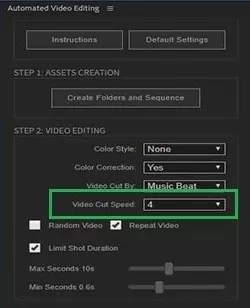
Since the process is automated, you can control its sensitivity by adjusting the Video Cut Speed value. The lower the value, the more accurate but slower the cuts will be. On the other hand, the higher the value, the less accurate but faster the cuts will be.
There are many other settings in the UI panel that you can adjust to refine the resulting edit. We suggest you play around with different settings to see what works best for your videos.
Also, check out:
- 5 Best Premiere Pro Plugins For Removing Green Screens
- 5 Premiere Pro Plugins To Remove Flicker From Videos
- 5 Best Video Noise Reduction Plugins For Premiere Pro
- 50 Best Premiere Pro Plugins (PDF Included)