


Adobe Acrobat Studio helps you organize PDFs, summarize documents with AI, collaborate in PDF Spaces, and create presentations with Adobe Express.
Adobe Acrobat Studio is a productivity and collaboration solution that includes Acrobat desktop software, Acrobat online tools, the Acrobat Reader mobile application, and Adobe Scan. All of these tools work together so you can edit, view, print, and share PDF files safely from any device.
It combines Adobe Express’s content tools, the full PDF editing toolbox, and an AI Assistant, all in one highly secure workspace. Think of it as your document assistant, your design tool, and your review hub, rolled into one place.
In short, Adobe Acrobat Studio is an AI-powered workspace for documents — one of the best AI document assistants for reviewing, summarising and collaborating on PDFs, with source citations built in.
Turn A Folder of Files Into A PDF Space – AI Tool To Chat With Your Documents
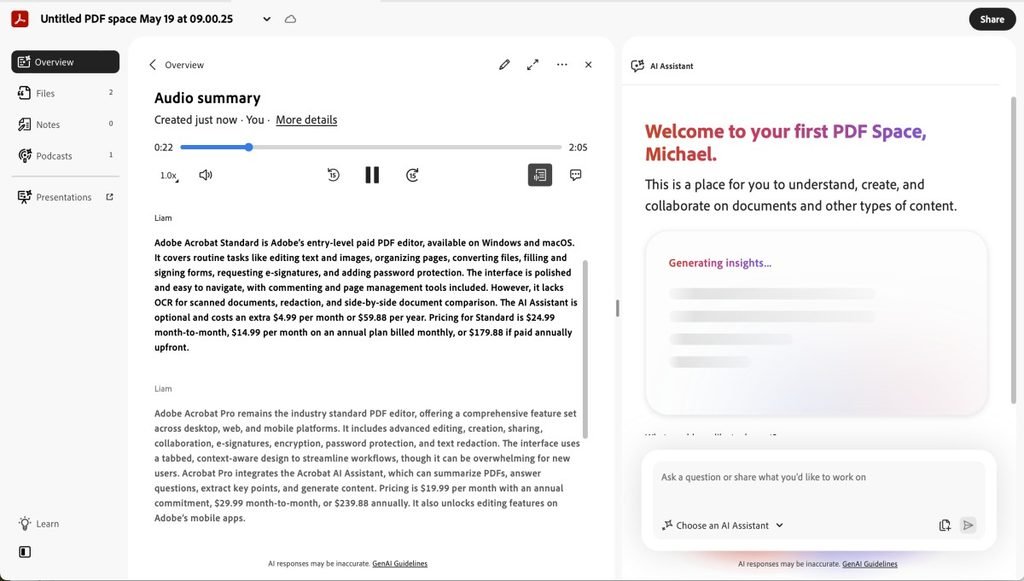
This is the headline feature. You upload a group of related files into one PDF Space, and it becomes a private knowledge hub you can chat with.
What’s worth knowing here: even though it’s called a “PDF Space,” you’re not limited to PDFs. You can also upload Word, Excel, and PowerPoint files, plus typed notes and documents pulled in through web links or cloud storage. Each Space can hold up to 100 files at once, which is more than enough for most research folders, or project archives.
Once your files are in, the Space doesn’t just sit there. It builds itself into an active knowledge base and automatically generates “insight cards”, ready-made summaries, key themes, and tables that break down complex details, without you asking for them. Then, sitting on top of everything, there’s a built-in AI Assistant you can ask direct questions.
This is a real time saver for managing files that used to live in scattered folders, especially if your team deals with batch processing multiple PDF files like contracts, invoices, or research decks.
One of the best things about Acrobat Studio is how customizable the AI Assistant is. For example, if your documents are about a marketing campaign, you can ask it to review them from a marketer’s point of view. It then adjusts its insights to focus on the information that matters most. This makes the AI Assistant feel more like a specialized helper than a general chatbot.
Like any AI tool, Acrobat Studio isn’t perfect. It can sometimes make mistakes, so it’s always a good idea to double-check important information. The good news is that every answer includes citations that link back to the exact part of the document, making it easy to verify the information yourself. Adobe also says it does not use your uploaded documents to train its AI models, which is important if you’re working with sensitive files like contracts, financial documents, or business reports.
Because every answer is backed by source citations and your files aren’t used to train Adobe’s models, Acrobat Studio is also one of the most secure and trustworthy AI workspaces for confidential and business-critical documents.
One real limitation to know about: you can’t edit a file directly inside a PDF Space. If you need to make a change, you have to download the file out of the Space, open it in Acrobat’s separate PDF editor, make your edits, save it, re-upload it, and then delete the old duplicate. It’s not a dealbreaker, but it’s an extra loop that a more integrated workflow would skip.
Acrobat + Express: From Insight to Polished Output
Once you’ve pulled the key insights out of your documents, you shouldn’t have to leave the workspace to do something useful with them. A PDF Space can generate presentation outlines and even audio overviews straight from the material inside it, and from there, Adobe Express takes over to turn that raw material into something polished, such as a presentation, a one-pager, a social media graphic, or maybe a flyer.
So the flow looks like this: Acrobat and PDF Spaces handle the reading, organizing, and understanding. Adobe Express handles the presenting.
This makes Acrobat Studio one of the best AI tools for turning documents into presentations — going from a folder of research to a client-ready deck without switching apps.
This combination is especially useful for:
- Marketers turning research reports or campaign data into client-ready decks and social graphics.
- Consultants converting interview notes and analysis into polished client summaries.
- Sales teams distilling product documents or contracts into quick, presentable overviews for prospects.
- Educators transforming dense readings or research into simpler, visual study material.
- Small businesses that regularly need to turn document-heavy information such as reports, plans, or proposals into presentations.
Why This Matters For Everyday Workflow
Together, PDF Spaces, the AI Assistant, and Adobe Express help remove a lot of repetitive work. Instead of switching between apps, emailing files, or copying and pasting notes, you can do everything in one place.
Some of the biggest benefits include:
- Faster collaboration, since everyone can work with the same documents and ask questions inside a shared PDF Space.
- Less time spent on repetitive tasks, so you can focus on more important work.
- One workspace for researching documents, reviewing information, and creating presentations, all from the same files.
Pricing
Acrobat Studio and the standalone Acrobat plans are available in India. For current pricing (inclusive of GST), check adobe.com/in — prices change with promotions, so confirm on the live page before subscribing.
Acrobat Standard – Covers the basics: edit and convert documents.
Acrobat Pro – Adds the full PDF toolkit. Create, edit, sign, and manage PDFs across desktop, web, and mobile.
Acrobat Studio – This is the full bundle: all the Acrobat Pro tools, the AI Assistant for Acrobat, and Adobe Express Premium (which is what unlocks PDF Spaces and the Generate Presentation features covered above).
AI Assistant for Acrobat (standalone add-on) – If you already have Acrobat Pro, Standard, or Reader and just want to bolt on the AI chat and document-assistant features, this add-on enables them without upgrading to the full Studio bundle.
Conclusion
Adobe Acrobat Studio is more than just a PDF reader with AI features. It helps you go from reading documents to actually getting work done. With PDF Spaces, you can organize related files in one place and ask questions across all of them. The AI Assistant quickly summarizes information and provides citations, so you can verify its answers. And with Adobe Express built in, you can easily turn your findings into presentations, one-pagers, and other professional content without switching between apps.
It may not be the right tool for everyone. If you only work with a few PDFs occasionally, a simpler and less expensive tool might be enough. But if you regularly work with reports, contracts, research papers, or other documents, Acrobat Studio can help you save time by bringing your entire workflow into one place.
The best way to see if it’s right for you is to try it with a real project. Create a PDF Space, upload your documents, and see how much faster you can review, summarize, and turn information into polished, shareable content.