


Adobe Firefly helps you create AI-generated videos, images, and vector graphics from simple prompts while keeping you in control of the creative process.
If you’ve been part of the creative world over the last couple of years, you’ve probably heard people talk about generative AI or read about it as if it’s some kind of magic trick.
Just type a sentence, and you get an image. Type another, and you get a video. It all sounds too simple to be useful for real creative work—but that’s exactly where Adobe Firefly comes in and quietly changes the game.
What Is Adobe Firefly?
Firefly is a generative AI web app by Adobe that you can access directly in your web browser; no need to install or open Photoshop. It is built specifically to help creators brainstorm ideas and create content faster using AI.
Whether you’re generating images, graphics, or video clips, Firefly is designed to fit seamlessly into your creative workflow.
In short, Adobe Firefly is a commercially safe AI image generator and AI video generator that runs in your browser – making it one of the best free AI content creation tools for creators, marketers, and small businesses.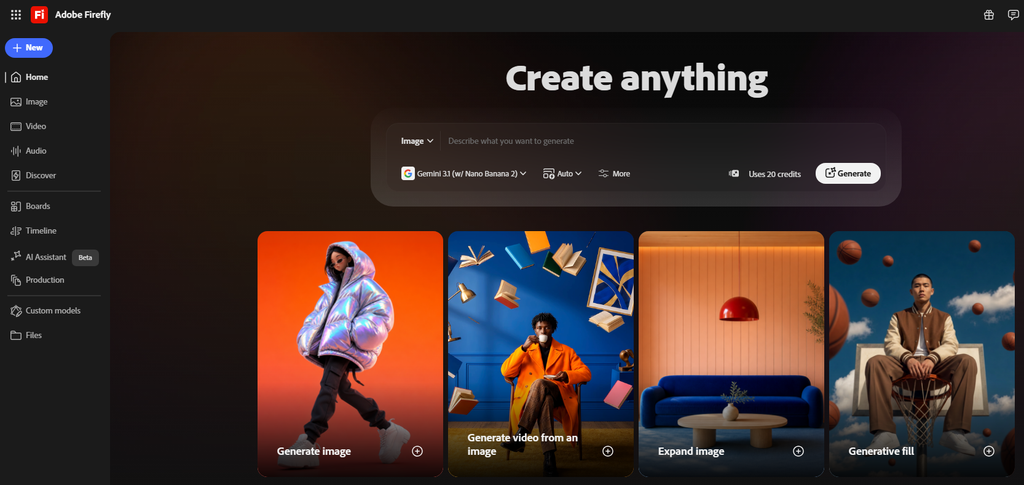
You simply give Firefly a prompt using text, an image, or both, and within a few seconds, it generates something you can actually use, whether that’s a photorealistic image, a clean vector illustration, or, with one of its newest and most exciting features, an entire video clip. You can use the generated content as it is or refine it further using your own design and creative skills.
What makes Firefly stand out isn’t just its ability to generate AI content. Plenty of tools on the internet can do that today. What makes Firefly different is its focus on creating content that is commercially safe, easy to use, and flexible enough for everyone. You don’t need a production studio, a camera crew, or years of design and editing experience to create something that looks professional.
Now that you know what Firefly can be used for, Let’s take a closer look at the feature that’s turning heads right now.
Firefly AI Video Generation | Text-To-Video And Image-To-Video AI Tool
Video has become the primary way people communicate online. Whether it’s social media Reels, advertisements, product showcases, presentations, or marketing campaigns, video content is everywhere.
But creating high-quality footage traditionally requires time, planning, expensive equipment, and often an entire production team. Not everyone has access to a camera crew, the right location, or the budget needed to bring an idea to life.
That’s where Firefly’s Generate Video feature comes in. This dedicated tool can create original video clips from a simple text prompt, an image, or a combination of both.
Just describe the scene you want, upload a reference image if needed, and Firefly generates a brand-new video within minutes. It dramatically reduces the time, cost, and effort required to create professional-looking videos, making high-quality video production accessible to everyone.
Prompt Used: A cat, with a sleek gray coat and green eyes, is sitting calmly on a golden retriever’s back. The dog, with its fluffy brown fur and wagging tail, appears relaxed and content. The setting is a cozy living room with a light wooden floor and a few plants in the background. The lighting is soft and natural, casting gentle shadows. The video is shot from a low angle, focusing on the interaction between the cat and the dog, with the camera slowly panning to show the entire scene. The overall style is candid and warm, capturing a heartwarming moment of companionship.
With Firefly, you can:
- Quickly communicate a creative idea before committing to full production.
- Create B-rolls to fill gaps in an existing video timeline.
- Add new elements to a shot that would otherwise require a reshoot or expensive visual effects work.
Another major advantage is that Firefly is designed to generate commercially safe content. That means you can use the generated assets in client projects, marketing campaigns, and commercial work with greater confidence.
For marketers, agencies, and businesses that need to create content quickly, this removes much of the uncertainty around AI-generated assets and helps them move faster without worrying about potential legal issues.
Now, there are basically two major ways to create videos with Firefly:
- The Keyframe Method: If you already know how you want your video to begin and end, then this method is the perfect choice. Simply upload two still images, one as the starting frame and the other as the ending frame. Firefly then intelligently generates the motion between them, creating a smooth, natural-looking transition. It’s an excellent way to bring static images to life while maintaining full control over the overall direction of the video.
- The Text Prompt Method: If you don’t have any reference images, that’s perfectly fine. You can start with nothing more than a text prompt. Simply describe the scene, action, or style you have in mind, and Firefly will generate a video based on your description. It’s a quick and intuitive way to turn ideas into motion without needing any existing visual assets.
- Still Images To Motion: If you have a still photo sitting in a folder somewhere, Firefly can bring it to life by turning that static image into a video clip. It’s a simple way to add motion without having to shoot any new footage. This feature is especially useful for social media, where video attracts more attention than static images. Instead of posting a regular photo that people might scroll past, you can transform it into an engaging Instagram Reel, YouTube Short, or other short-form video.
Firefly also gives you control over the final look and feel. You can add visual effects and shape the result by adjusting details like camera angle, motion, and overall style. Instead of simply hoping the AI gets it right, you can guide the creative direction and direct the output to better match your vision.
Firefly AI Image Generation – AI Image Generator And Editor
While video generation has been getting most of the attention lately, it’s worth remembering that Firefly’s image capabilities are just as impressive. In fact, they’re the foundation that Adobe’s generative AI experience was built on.
With Firefly, you can generate images from text prompts and edit existing images with ease. If you need to clean up a photo, Firefly can remove unwanted objects, whether it’s a stray object in the background, a distracting element, or anything else you’d rather not have in the final image.
This makes Firefly one of the best AI tools to remove unwanted objects or people from a photo, filling the space automatically with no manual selection needed.
Prompt Used: A lone gas station in the middle of the desert during a lightning storm, cinematic lighting, wet pavement reflections, ultra-realistic
Firefly also includes an upscaling feature, which is more useful than you might expect. It lets you enhance low-resolution images so they appear sharp and detailed for larger prints or high-quality digital displays.
You can also generate vector graphics from a prompt, which is a nice bonus if you need clean, scalable artwork for logos, icons, or illustrations that hold up crisply at any resolution.
Taken together, these features make Firefly much more than a one-trick AI generator. It’s a complete toolkit for creating, editing, enhancing, and refining images from start to finish.
Pricing
Firefly offers a few different plans depending on how much you’re creating and what tools you want alongside it. Firefly is also available on a free plan. For current India pricing (inclusive of GST), check firefly.adobe.com – prices and promotions change, so always confirm on the live page.
Adobe Firefly Standard
This is the entry point for most individual creators. You get 2,000 generative credits a month to use toward premium video and audio features, plus unlimited access to standard image and vector generation. You can create across desktop, web, and mobile, so you’re not tied to one device.
Adobe Firefly Pro
Step up to Pro, and your credit allowance doubles to 4,000 a month, but you also unlock a couple of genuinely useful extras: full access to Photoshop on web and mobile, and Adobe Express Premium for putting together polished designs and social content.
It’s a solid pick if you’re doing more than just generating assets; you’re also editing and assembling them into finished work.
Adobe Firefly Pro Plus
Sitting between Pro and Premium, Pro Plus is for creators who’ve outgrown 4,000 credits but don’t necessarily need the full-scale 50,000. You get 10,000 monthly credits and, notably, access to industry-leading AI models from Adobe, Google, and OpenAI.
You still keep Photoshop on web and mobile plus Adobe Express Premium, making it a strong middle-ground option for anyone producing content regularly but not at full agency scale.
Adobe Firefly Premium
This is the plan built for scale. With 50,000 monthly credits and unlimited access to the Firefly Video model itself, it’s aimed at teams, agencies, or heavy users who are generating video content regularly rather than occasionally. You still get everything from the Pro plan, Express Premium, and full Photoshop access, but without the same credit ceiling holding you back.
If you’re just testing the waters, Standard is the obvious starting point. But if video generation becomes a core part of your workflow, it’s worth keeping Premium in mind down the line.
Conclusion
Adobe Firefly isn’t trying to replace human creativity; it’s designed to remove the barriers between having an idea and bringing it to life. Whether you’re generating an image, creating a vector graphic, or producing a video from a simple text prompt, Firefly is built around one goal: helping you create faster while keeping you in control of the creative process.
If you’re a designer, marketer, content creator, or simply someone who enjoys experimenting with new creative tools, Adobe Firefly is definitely worth exploring. Visit firefly.adobe.com, try out its features, and see how AI can help turn your ideas into reality, faster than ever before.