


Adobe Express is an all-in-one design tool for creators. Make Instagram posts, Reels, flyers, websites, and remove background easily with AI.
There was a time when being a designer wasn’t something common. Whether it was graphics, videos, or websites, you needed to know complicated design software or coding to create anything.
But not anymore, because with Adobe Express, almost anyone can become a graphic designer, an editor, or even build websites without writing a single line of code.
What Is Adobe Express?
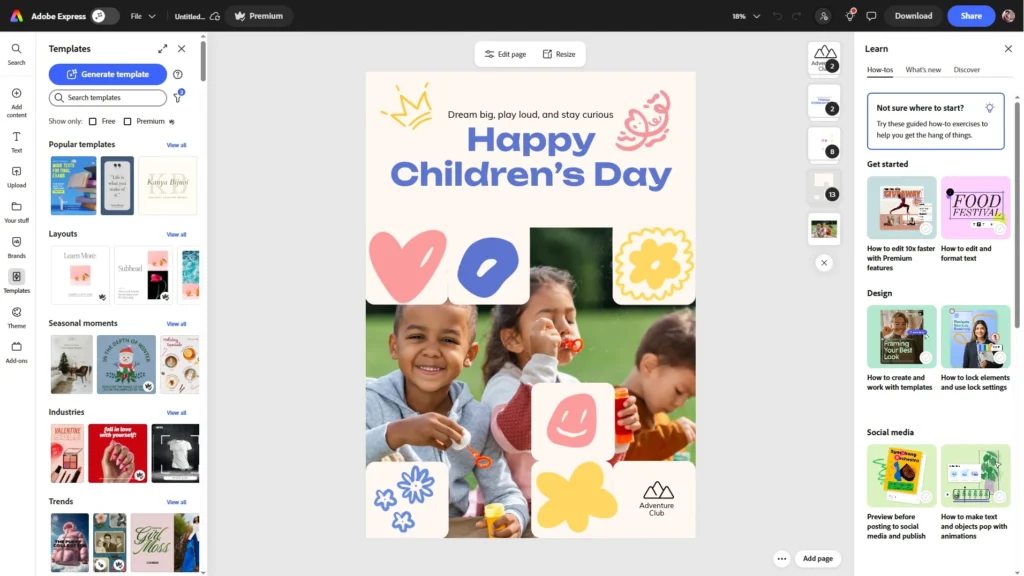
Adobe Express is an easy-to-use, cloud-based media creation tool that helps you create social media graphics, promotional videos, presentations, and single-page websites. It’s made for people who want fast results without a complicated workflow.
You can think of it as an all-in-one tool where you can design and create things even without any design knowledge, such as:
- Social Media Graphics – You can create Instagram posts, Stories, YouTube thumbnails, YouTube profile photos, Facebook profile covers, LinkedIn covers, LinkedIn posts, and even Memes.
- Social Media Videos – This includes Instagram reels, YouTube shorts, and TikTok videos. You can even create short horizontal videos with text overlays, animated elements, and transitions.
- Marketing Material – If you are building a brand, Adobe Express helps you design logos, flyers, brochures, posters, business cards, Invoices, and reports.
- Presentations – If you want to pitch a product, explain your services, or simply present your data, Adobe Express can help you create modern-looking presentations without spending hours formatting everything.
- Single Page Websites – You can even build professional-looking business and portfolio websites with Adobe Express.
Since Adobe Express works completely on the cloud, you don’t need a high-end PC or any expensive, complicated design software. Even with a basic laptop, you can still create eye-catching designs easily.
And yes, you can use it on your phone too, which is super helpful if you’re someone who creates content on the go.
Generative AI In Adobe Express
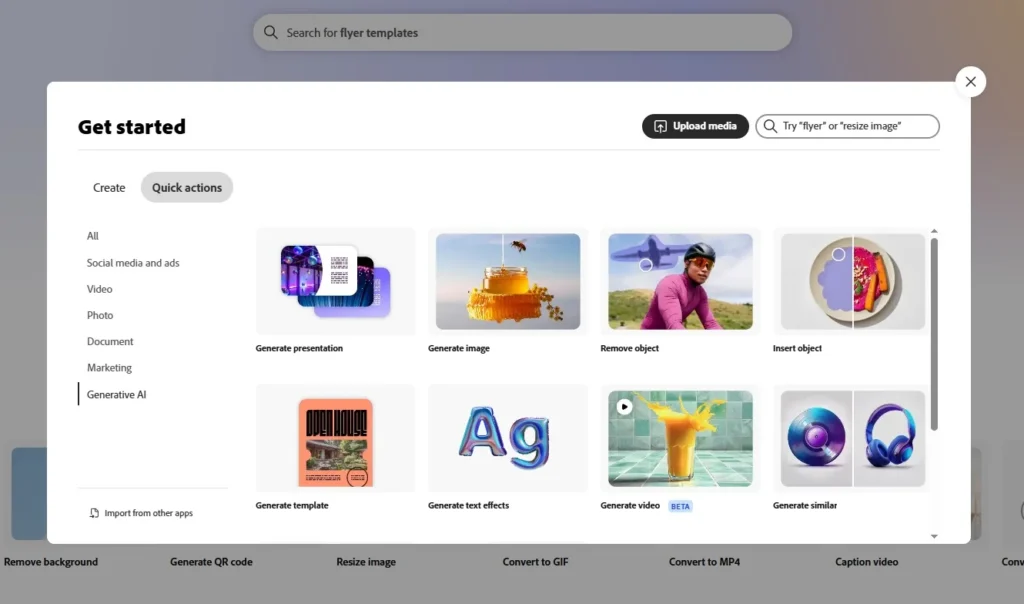
Although there are many other cloud-based media creation tools available online, what makes Adobe Express unique is its generative AI tools. You can access these tools by clicking on the “Generative AI” tab on the Adobe Express homepage.
With AI, you can generate presentations, create images using prompts, remove background, delete or insert objects in your photos, and you can even generate videos with text prompts.
By default, Adobe Express uses the Adobe Firefly model for generative AI, but now it also supports the Gemini 2.5 Flash Image model (also known as “Nano Banana”). This model is highly optimized for both image understanding and image generation.
Free Image Background Remover
Adobe Express also allows you to remove the background from any image easily and accurately.
To do this, you simply need to go to Adobe Express’s Background Removal tool and upload your image. In just a few seconds, Adobe Express will automatically remove the background from your uploaded image.
Then, you can either add a new background to your image or download it as a PNG with a transparent background.
The best part is that Adobe Express’s background removal tool is completely free to use, and yes, you can use it on your mobile phone as well.
We’ve been using this background removal tool for quite some time to create YouTube thumbnails, and trust us when we say this – we haven’t found faster or more accurate results with any other image background remover.
Adobe Express AI Assistant
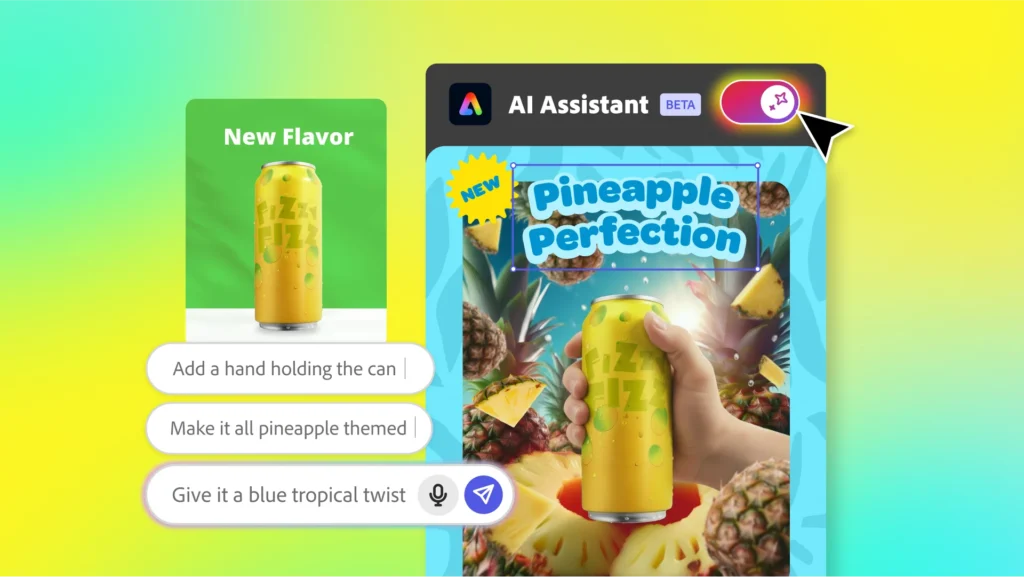
Another feature that makes Adobe Express stand out from others is its new AI Assistant feature. With its help, you can create or edit any design using prompts.
Let’s say you’re designing a poster in Adobe Express. The moment you turn on the AI Assistant, you’ll get an input box. Now you just have to type whatever changes you want in your design as a prompt, and Adobe Express’s AI will take care of the rest.
In short, it works like your personal assistant; just give it commands, and it will automatically make changes to your design.
Here are a few things that Adobe Express AI Assistant can do for you:
- Add or Replace Objects – You can use prompts to add or replace images, backgrounds, and even text in your design.
- Apply Animations – You can animate specific objects in your design with a simple prompt. You can also change the animation timing, speed, and style—or remove the animation entirely.
- Apply Colors – With the AI Assistant, you can change and enhance any color in your design.
- Edit Images – You can adjust image brightness, saturation, and opacity, add filters and effects, combine multiple images, crop and resize images, and even create collages.
- Generate Text – If you want to add or modify any text in your design, the AI Assistant can do it in seconds.
- Position and Align Elements – You can change the position and alignment of objects in your design.
- Style Text – You can stylize any text in your design by adding basic text effects and changing the font styling and font family—all by typing simple prompts.
Who Should Use Adobe Express?
Adobe Express is built for people who want fast, simple, and consistent results without having to learn complicated design software. It’s especially perfect for Instagram content creators who need to make content regularly.
It’s also a great option for people who aren’t designers, but still want to create content that looks clean, modern, and professional.
Plans & Pricing
For Individuals
- Adobe Express Free – This plan offers basic content creation tools, limited generative AI credits, and assets. You get access to more than 100,000 images and video templates along with more than a million royalty-free stock photos, videos, music tracks, and design elements.
- Adobe Express Premium – For ₹398.84 a month, this plan offers millions of premium image and video templates, more than 200 million royalty-free stock photos, music tracks, and design elements, along with 250 generative AI credits per month.
- Adobe Firefly Pro – For ₹1,596.54 a month, this plan offers millions of premium image and video templates, more than 200 million royalty-free stock photos, music tracks, and design elements, along with 4000 monthly generative AI credits.
For Businesses
- Adobe Express Team (Best for teams of 2 or more) – For ₹419 per person a month, this plan offers millions of premium image and video templates, more than 200 million royalty-free stock photos, music tracks, and design elements, along with 250 generative AI credits per month.
- Adobe Express Enterprise (Best for teams of 100 or more) – This plan includes all the features available in the Adobe Express Teams plan, but you need to contact Adobe for pricing.
For Students
- Adobe Express Free – This plan offers basic content creation tools, limited generative AI credits, and assets. You get access to more than 100,000 images and video templates along with more than a million royalty-free stock photos, videos, music tracks, and design elements.
- Adobe Express Premium: –For ₹398.84 a month, this plan offers millions of premium image and video templates, more than 200 million royalty-free stock photos, music tracks, and design elements, along with 250 generative AI credits per month.
For Educators
- Adobe Express K-12 Education – This plan is absolutely free for qualified K-12 educators, and it offers millions of premium image and video templates, more than 200 million royalty-free stock photos, music tracks, and design elements, along with 250 generative AI credits per month.
- Adobe Express Higher Education – This plan offers millions of premium image and video templates, more than 200 million royalty-free stock photos, music tracks, and design elements, along with 250 monthly generative AI credits. You need to contact Adobe for pricing.
Conclusion
At the end of the day, Adobe Express is not trying to replace professional design tools; it’s trying to make content creation faster, easier, and accessible for everyone.
And what truly makes it stand out is its generative AI workflow, powered by Adobe Firefly, and now the Gemini 2.5 Flash Image model (Nano Banana). Add to that the new AI Assistant, and you get a tool that can take you from concept to content in just a few minutes.
So if you’re an Instagram content creator or someone who simply wants clean and professional-looking designs, Adobe Express is definitely worth trying.